
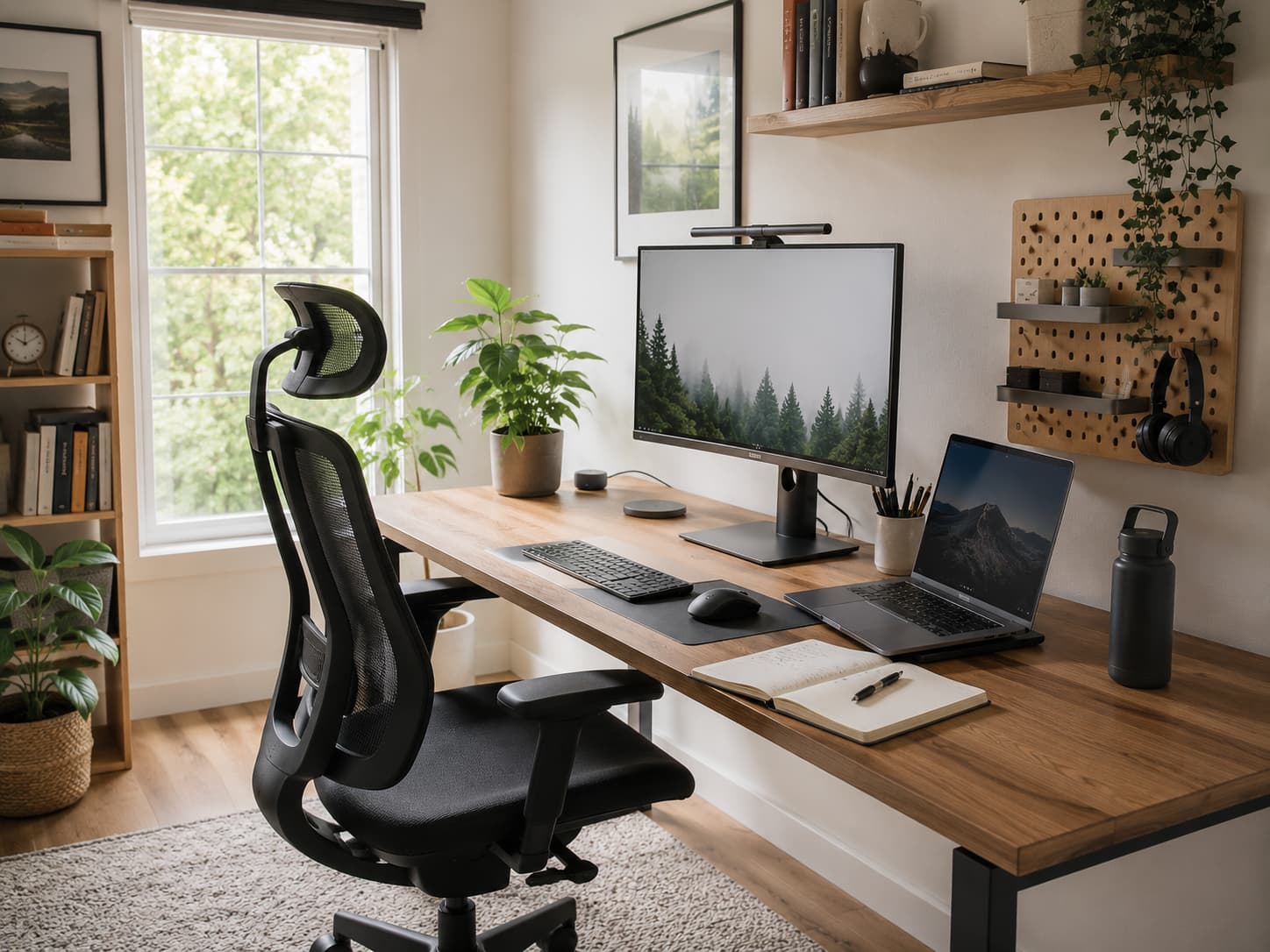
Learn How You Use Your Workspace
Consider your workspace’s demands before purchase. People often design a home office based on how they think it should look rather than how they operate. Poor planning cannot be fixed by a nice desk layout. A person who mostly attends video meetings has different needs than someone who writes, examines, designs, or organizes papers. A frequent meeting attendee may need better lighting and a quieter background, while a detailed computer user may need a larger monitor and comfortable workstation arrangement.
Before decorating, think about your regular routine. Notice where you become distracted, what you use often, and what’s uncomfortable about your arrangement. These findings help you design a habit-friendly office. Space constraints are typical. Not everyone has an office room. A small apartment, shared home, or bedroom nook can be useful provided it has a purpose. Creating a consistent work environment is crucial. Start by defining your basic needs. You need a firm surface for your equipment, a comfortable seat, enough lighting to reduce strain, and a way to keep vital objects accessible. Everything else should reinforce these fundamentals, not distract.
Select the Right Home Office Location
Workplace location influences concentration more than most people realize. A high-traffic desk may cause disruptions, while a poorly lit nook may fatigue you after long hours. The best place depends on your home and work style. Some of the best workstation qualities are natural light. Positioning a desk near a window can improve room comfort and reduce the need for artificial illumination during the day. Putting a monitor in front of a bright window might cause screen glare; therefore, changing the desk angle is usually necessary.
Noise matters too. Although not often possible, a quiet space is helpful. If your home has regular background noise, adopting a quieter spot, utilizing soft furnishings to prevent echoes, or setting a schedule to work at quieter times will help you focus. Some people operate best in a separate workplace from relaxing areas. Others want a flexible setup where a small desk blends into a living room. There’s no right order. The best option simplifies job start-up and concentration. Making the mistake of choosing an empty location is prevalent. Unused corners are not always desirable office spaces. Consider comfort, privacy, lighting, and maintenance over months or years.
Set Up Ergonomics for Long-Term Comfort
Working ergonomically is structuring your environment so your body can operate comfortably and naturally. Poor setup may not create obvious problems, but spending many hours in an uncomfortable position might influence your mood. The chair is crucial to a home office. A good chair should support your back, let your feet rest on the floor, and foster a relaxed sitting position. Buying a chair based on appearance without considering how it feels after several hours is a common mistake.
Desk height also matters. Your shoulders should not be stiff, and your arms should rest comfortably instead of reaching for the keyboard. A keyboard tray or chair height adjustment might increase comfort if your workstation is excessively high or low. Monitor placement also benefits from slight modifications. Too low a screen may cause neck bending, while too far away may cause eye strain. Many people find it convenient to place the display at eye level and a reasonable viewing distance. Ergonomics doesn’t need pricey gear. A few thoughtful changes can boost your workspace. A showroom-style office is not the goal, but a space where your body feels supported during daily duties.
Organize Your Workspace for Purpose
A productive workspace doesn’t need to be minimalist or empty, but everything should have a purpose. Unused papers, strange accessories, and old equipment on your desk often distract you. Organization is not about making things flawless. It involves decreasing daytime decisions. Start by listing your most-used goods. Your keyboard, notebook, headphones, charger, and commonly used papers should be accessible. Store less vital objects to save desk space. Because it saves time searching, this basic setup avoids small disruptions.
Small improvements in cable management also make a difference. Loose cables can clutter a workspace and make moving equipment and cleaning the desk difficult. Simple organizers, cable clips, and routing cords beneath furniture can simplify management. Digital organization is equally important as physical. Projects can be completed faster with a clean desktop, logical organizational system, and consistent file name. Spending too much time researching instead of working causes many productivity issues. Avoid elaborate, maintenance-intensive organization structures. An effort-intensive system will be abandoned. Your setup should seem natural and take only a few minutes to maintain.
Select Technology That Aids Your Work Instead of Creating Issues
Technology is crucial in a modern home office, but more technology does not guarantee productivity. Beginning workers often buy accessories before enhancing their workspace. A reliable computer, consistent internet connection, and comfortable input devices are frequently more valuable than superfluous accessories. Start with task-specific tools. Writing documents may merely require a comfortable keyboard and reliable storage, while design software may require a more powerful computer and larger display. Your equipment should solve problems, not just upgrade the desk.
Backup systems are equally important. Important work files should be in multiple places. If your computer malfunctions, an external drive, cloud storage, or other backup can save your work. Online learners and remote workers worry about internet reliability. Instead of buying new equipment, find out why your connection drops often. Router placement, obsolete hardware, close device interference, or a better internet package may be the problem. An excellent tech setup should be almost undetectable at work. When your tools work, you can focus on your tasks instead of troubleshooting.
Improve Focus with Lighting and Room Design
Lighting greatly affects workplace comfort. A dark space makes viewing screens and documents harder, while intense illumination is uncomfortable. The goal is balanced lighting for stress-free work. Most improvements are simplest with natural light. Ideally, set your desk in sunshine without screen reflections. Changing curtains, desk orientation, or monitor angle helps reduce glare.
Activities should be supported by artificial lighting. Nighttime work or insufficient room lighting can benefit from a desk lamp. The light should brighten your workspace without casting shadows. The environment affects productivity too. Overcrowding, discomfort, and visual distractions can make it hard to focus. Keeping surfaces clean, adding a plant, or utilizing colors and décor you like can improve the space. Because they make the workspace inviting, personal touches are important. Too many decorations might sometimes distract. A comfortable, focused work atmosphere is the balance.
Create Productive Home Office Habits
An organized workstation boosts productivity, but how you utilize it matters too. Many people build a nice office but struggle because they lack a routine for starting, organizing, and ending their workday. Creating a beginning and end is a good practice. Starting work on schedule, evaluating priorities, and setting your workstation will help you focus. Finally, shutting superfluous apps, arranging documents, and clearing the desk improves tomorrow’s start.
Other distractions include notifications. Even innocent messages, emails, and app alerts can disrupt concentration. Notification settings and communication check times can protect focused work periods. Productive routines include breaks. Sitting for lengthy periods can drain energy and comfort. Long work periods can be made easier with short breaks to stand, walk, or look away. Your home office should support your routines, not just motivate you. A straightforward routine and pleasant atmosphere make system maintenance easier over time.
How to Avoid Common Home Office Mistakes
One of the biggest blunders is establishing an appealing workspace that doesn’t meet daily demands. People occasionally spend money on beautiful goods or advanced accessories but ignore desk height, illumination, and organization. Allowing the workspace to hold everything is another mistake. It’s tougher to focus on work when work equipment, household things, documents, and personal stuff are together.
Poor storage planning might also cause issues. A desk may look clean after setup, but clutter rapidly returns without a space for paperwork, chargers, and supplies. After use, good organization examines where items belong. Ignoring maintenance is another issue. Dust, old paperwork, tangled cables, and idle equipment degrade the workspace. Like other rooms in the house, a profitable office needs maintenance. After waiting for the optimal setting, many improve their workspace. Home offices can be finished in several days. Making incremental changes over time is more practical and results in a system that suits your needs.
Maintain your Home Office for Long-term Productivity
Creating a productive workspace is just the start. Your demands, equipment, and daily routine may alter over time. Maintenance keeps your office supporting you. Simple weekly reviews can prevent problems from worsening. Check your workstation for clutter, remove unneeded files, clean equipment, and fix anything uncomfortable. Small changes are easier than reorganizing the entire area.
Your workspace should change with your goals. Remote workers starting out may need a simple setup, while those handling more complex projects may need extra storage, equipment, or meeting space. Consider how your workspace affects your work. Frequently avoiding the office, feeling uncomfortable after working there, or struggling with distractions indicate a problem. Instead of striving harder, modifying the environment can boost productivity. A successful home office doesn’t need pricey furniture or a pristine appearance. This realistic atmosphere helps you do crucial activities easily and reliably.
Conclusion
FAQs
1. How much area do I need to have a good home office?
You need not a separate room. A small dedicated place that allows adequate room for a comfortable chair, work surface, and equipment will work effectively. The most crucial thing is consistency. Having a defined workspace also helps to create a clear distinction between work and personal time.
2. What is the most crucial thing about a home office?
Usually it’s the comfort thing first. More than some stylistic enhancements, a supportive chair and well-positioned workstation can make a difference to daily work. Once you have a very comfortable base, you may upgrade the electronics, the storage, and the looks as you see fit.
3. What are some ways to make a home office more productive for free?
There are lots of free enhancements. You may dramatically improve your experience without spending any money at all by rearranging your workstation for better lighting, removing unneeded items, organizing files, tweaking notifications, and developing a work pattern.
4. Should my home office be separate from my living space?
An additional room can be helpful but isn’t essential. Many people are successful in shared areas by having good boundaries, keeping their work stuff orderly and establishing rituals that indicate when work begins and stops.
5. How often should I reorganize my home office?
There is no set schedule. Usually a brief evaluation every few weeks and a deeper adjustment when your needs alter suffice. Organization is about keeping the work environment functional, not continuously redesigning it.

ZapKido Editorial Team creates practical guides covering digital life, productivity, everyday technology, smart home solutions, and home organization. Our content focuses on clear explanations, useful settings, practical habits, and straightforward solutions that readers can apply in everyday situations. We aim to make technology and everyday tasks easier to understand without unnecessary complexity.